2D Barcode Scanner: How to Choose the Right QR Reader
Buying 2D barcode scanners in bulk? Compare handheld, wireless, fixed-mount and desktop models — scan speed, interfaces and SDK support — before you order from a manufacturer.
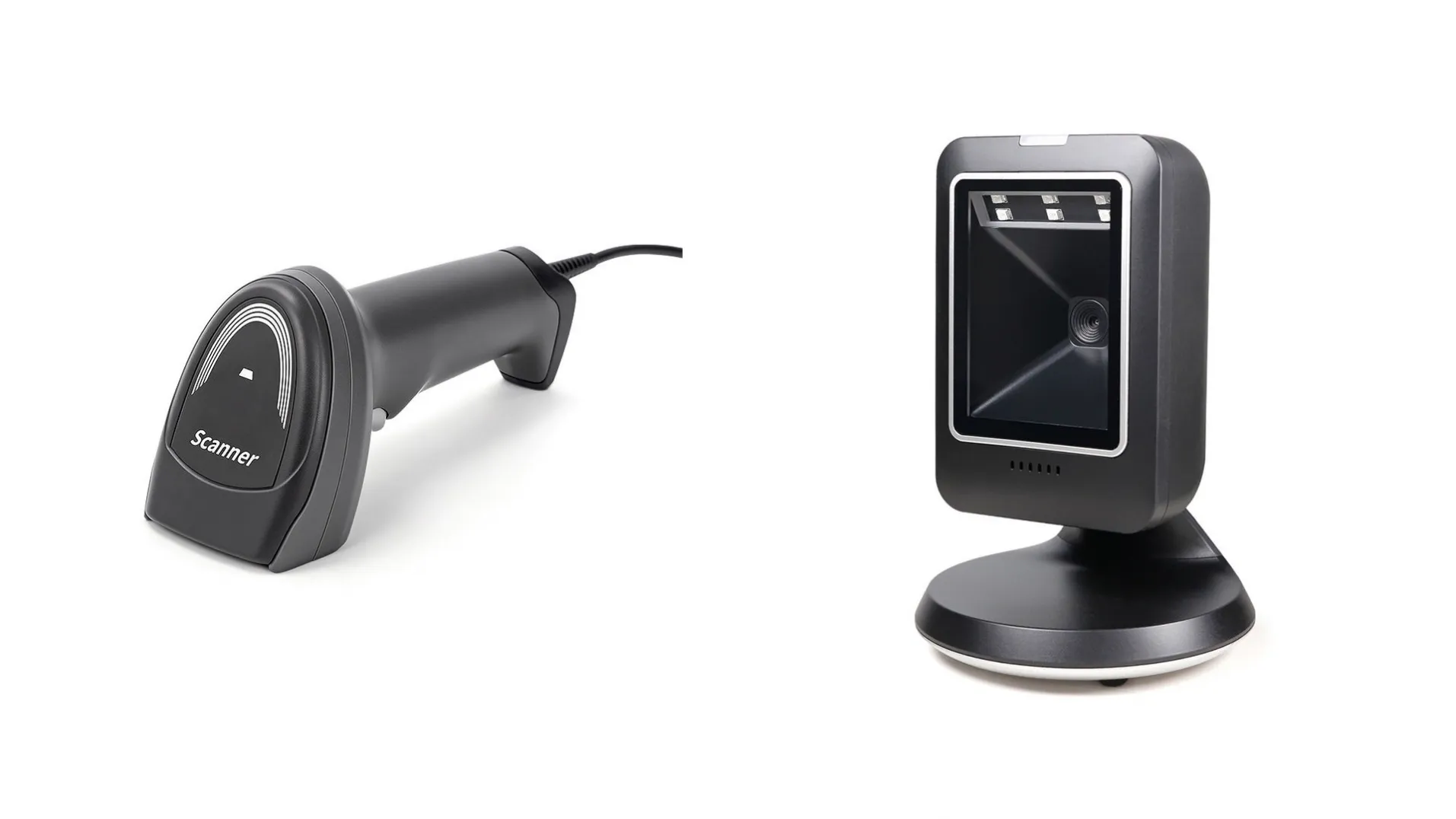
A 2D barcode scanner reads QR codes and 2D barcodes — plus standard 1D barcodes — from paper, labels, and phone screens, so one device covers checkout, ticketing, and warehouse scanning for retail and logistics buyers.
That sounds simple, but the wrong scanner slows down every transaction. A handheld scanner that cannot read a cracked phone screen will hold up a queue. A fixed-mount scanner with the wrong interface will not talk to your kiosk. And a wireless scanner with too small a battery will die halfway through a warehouse shift. This guide explains the four main types of 2D barcode scanner, the specifications that actually matter, and what to check before you buy in bulk — whether you are stocking a retail chain, equipping a warehouse, or integrating scanners into self-service kiosks.
What Is a 2D Barcode Scanner?
A 2D barcode scanner uses a camera-style image sensor — usually CMOS — to photograph a barcode and decode it, instead of sweeping a laser line across it. Because it captures an image, it can read codes in any orientation: upside down, sideways, or at an angle. It also reads codes printed on paper, etched on metal, or displayed on a phone screen, which matters more every year as mobile tickets, e-wallets, and QR-code payments spread.
The "2D" in the name refers to codes that store data in two dimensions, such as QR codes, Data Matrix, and PDF417. These codes hold far more information than a traditional 1D barcode — a web address, a ticket number, or a full product record instead of just a short number. Every 2D scanner also reads 1D barcodes, so one device replaces two.
For a buyer, the practical point is this: if your customers or your operations use QR codes anywhere — mobile payments, e-tickets, loyalty apps, parcel labels — you need a 2D scanner. A 1D-only laser scanner cannot read them at all.
1D vs 2D: Why 2D Has Become the Default
Ten years ago, most checkout counters used 1D laser scanners. Three changes pushed 2D imagers into the default choice:
- Phone screens. Laser scanners cannot read a barcode displayed on a glowing screen. CMOS imagers can. As soon as customers started paying and checking in with their phones, 1D-only scanners became a bottleneck.
- Damaged and small codes. A 2D imager reads codes that are partly damaged, poorly printed, or very small — down to fine resolutions such as Code39 4mil on our EP9500Y fixed-mount scanner, which captures at 1280×800 resolution. Laser scanners struggle with all three cases.
- Omnidirectional reading. A 2D imager reads a code at any angle, so cashiers do not have to twist each item to line it up. At a busy checkout, that saves seconds on every sale.
None of this means 1D barcodes are disappearing — they are still printed on most retail packaging. It means the scanner you buy should read both, and a 2D imager does exactly that.
The Four Types of 2D Barcode Scanner
Scanners divide into four form factors, and the right one depends on where the scanning happens. Our range covers all four, so the examples below use real models with verified specifications.
Handheld wired scanners
The standard counter scanner: the operator picks it up, points, and scans. A wired USB connection means no charging and no wireless dropouts, which suits fixed checkout counters. Our DS22 Lite handheld 2D barcode scanner connects over USB, uses a CMOS sensor, scans at 300 times per second, and comes in Nova White or Twilight Black, with SDK support and a 1-year warranty. If your counters already have a POS terminal with a spare USB port, this is the simplest option to deploy.
Wireless handheld scanners
Wireless scanners add a 2.4G radio link, so the operator can walk away from the counter — scanning stock on a shelf, checking parcels at a loading bay, or working a market stall. Our DS4608 wireless 2D barcode scanner runs on a 2000mAh battery, offers USB and RS232 interfaces, scans at 300 times per second, and ships with SDK support and a 1-year warranty. The BWHS-25L wireless scanner with stand adds a hands-free stand and a 640×480 optical resolution, so it can sit on a counter as a presentation scanner and lift off for handheld use.
Fixed-mount scanners
Fixed-mount scanners bolt into a kiosk, vending machine, ticket gate, or access terminal and scan codes presented to them — no operator needed. The key numbers are resolution and scan speed, because the scanner must catch a code on a moving phone or a crumpled ticket. Our EP9500Y fixed-mount 2D barcode scanner captures at 1280×800 with a CMOS sensor, scans at 25 inches (63 cm) per second, reads Code39 down to 4mil, and carries a 2-year warranty with SDK support for integration. If you build kiosks or self-service terminals, confirm the mounting dimensions and the SDK before you order — integration effort is the real cost of a fixed-mount scanner, not the unit itself.
Desktop omnidirectional scanners
Desktop omnidirectional scanners sit flat on the counter and scan anything passed over them, in any orientation, with no trigger press. They suit high-volume checkouts where the cashier's hands never stop. Our MP6300STD desktop omnidirectional 2D barcode scanner uses a CMOS sensor with auto-induction — it wakes and scans when an item approaches — connects over USB, and ships with SDK support and a 1-year warranty, in black or white. For a supermarket lane or a busy convenience store, this is the fastest form factor per transaction.
Which Scanner Type Fits Your Operation?
Use this table to narrow the choice, then confirm the exact model against your host system and software.
| Scanner type | Example model | Connection | Scan speed / resolution | Best for |
|---|---|---|---|---|
| Handheld wired | DS22 Lite | USB | 300 scans/sec, CMOS | Fixed checkout counters |
| Wireless handheld | DS4608 | 2.4G wireless, USB + RS232 | 300 scans/sec, 2000mAh battery | Warehouse, stockroom, mobile counters |
| Wireless with stand | BWHS-25L | 2.4G wireless, USB | 640×480 optical resolution | Counters needing handheld + hands-free |
| Fixed-mount | EP9500Y | USB | 25 in/s (63 cm/s), 1280×800 | Kiosks, vending, ticket gates |
| Desktop omnidirectional | MP6300STD | USB | Auto-induction, CMOS | High-volume checkout lanes |
All five models support SDK integration and carry a 1-year warranty, except the EP9500Y, which carries a 2-year warranty. All specifications above are taken from the published product pages.
Choosing by Business Type
Different operations stress a scanner in different ways. Here is what matters most for each:
- Retail shops and supermarkets. Speed per transaction decides the choice. A desktop omnidirectional scanner keeps the queue moving at the main till, while a handheld wired scanner covers the returns desk and the stockroom. If customers pay with phone QR codes, confirm screen reading before you buy — every 2D imager in our range reads phone displays, but always test with your own phones and your own codes.
- Warehouses and logistics. Range and battery matter more than counter speed. A wireless scanner lets staff scan pallets without dragging a cable, and the battery must last a full shift. Check the interface too: RS232 is still common on warehouse host systems, which is why the DS4608 offers both USB and RS232.
- Kiosk and self-service integrators. The scanner is a component, not a standalone tool. Mounting size, SDK quality, and scan speed on phone screens decide the project. A fixed-mount module such as the EP9500Y is built for this role — it is the same class of scanner fitted into our self-service kiosks alongside 80mm thermal printers.
- Restaurants and cafes. Counter space is tight and staff move fast. A compact wireless scanner with a stand works well: it sits hands-free during service and lifts off for table-side scanning. A wired handheld scanner is the lower-maintenance alternative if the counter never moves.
- Distributors and resellers. Stock the form factors your customers ask for most, and check that the supplier can keep the same model in supply for repeat orders. A manufacturer that controls its own production can hold a model available far longer than a trader buying whatever is on the market.
What to Check Before You Buy
Before you order 2D barcode scanners in bulk, run through this checklist:
- Scan performance on your codes. Test with your actual barcodes — your labels, your phone screens, your ticket stock — not the supplier's demo codes. Check damaged and small codes too: fine-resolution reading, such as Code39 4mil, matters if you print small labels.
- Interfaces. Count what your host system needs: USB for POS terminals, RS232 for older warehouse systems, 2.4G wireless for mobile use. Confirm the cable and receiver are included, and check whether the scanner works as a plug-and-play keyboard device or needs a driver.
- SDK and software support. If you integrate the scanner into your own software or a kiosk, ask for the SDK up front and confirm it covers your operating system. All five GHI scanner models ship with SDK support.
- Battery and charging (wireless models). Ask how long a full charge lasts under normal use, and how the scanner charges — cradle, cable, or both. A scanner that cannot finish a shift creates a second purchase: spare batteries or spare scanners.
- Certifications. CE, RoHS, and FCC marks show the hardware meets safety and electromagnetic standards in your market. If you sell into India or the EU, check for BIS and REACH as well. GHI hardware carries CE, RoHS, FCC, BIS, and REACH certification.
- Durability. Handheld scanners get dropped. Ask about drop resistance and sealing before you deploy them in a warehouse or a busy store.
- Supply continuity and warranty. Confirm the warranty period — 1 year on most of our models, 2 years on the EP9500Y — and check that the same model will still be available when you reorder. GHI has manufactured POS hardware in Guangzhou since 2010, supplies over 2,000 customers, and ships more than 5,000 POS units a month.
Why Buy Direct from the Manufacturer
Buying scanners from the factory that builds them changes the conversation. You talk to the people who designed the hardware, so questions about SDK behavior, interface options, and firmware get answered directly instead of passing through a reseller. Custom configurations — housing color, branding, packaging — are handled in-house, and volume supply runs on the factory's own production schedule.
GHI has manufactured POS hardware in Guangzhou since 2010 and holds a 4.9 out of 5 customer rating. We build all-in-one POS terminals, self-service kiosks, barcode scanners, thermal printers, cash drawers, and time attendance machines, and we provide OEM/ODM for multiple brands — so the scanner you buy can carry your name, not ours. If you are weighing OEM against off-the-shelf hardware, read OEM POS Terminal vs Off-the-Shelf: Which Is Better for System Integrators? first. You can also see how scanners fit into a full checkout setup in All-in-One POS Terminal: How to Choose the Right Touch Screen POS System, or browse the full POS hardware range.
Frequently Asked Questions
What is a 2D barcode scanner?
A 2D barcode scanner uses a CMOS image sensor to photograph and decode barcodes, including QR codes, Data Matrix, and standard 1D barcodes. It reads codes in any orientation and from phone screens, which laser scanners cannot do.
Can a 2D barcode scanner read 1D barcodes?
Yes. Every 2D imager also reads 1D barcodes, so one device covers both. If your operation still uses 1D labels on packaging and QR codes for payments or tickets, a 2D scanner handles both without a second device.
Should I choose a wired or wireless barcode scanner?
Choose wired USB for a fixed counter — no charging, no dropouts. Choose wireless 2.4G when staff move away from the counter, such as in a warehouse or stockroom. Check battery capacity first: the DS4608, for example, runs on a 2000mAh battery.
What scanner do I need for a self-service kiosk?
Use a fixed-mount 2D scanner such as the EP9500Y, which bolts into the kiosk and scans codes presented to it. Confirm mounting dimensions, the USB interface, and SDK support before ordering, and test it with the phone screens your customers actually use.
Do 2D barcode scanners read phone screens?
Yes — CMOS imagers read barcodes displayed on phone screens, which is essential for mobile payments, e-tickets, and QR check-ins. Always test with your own phones and codes before a bulk order, since screen brightness and cracked glass affect readability.
Can I get barcode scanners with my own brand?
Yes. Manufacturers offering OEM/ODM can supply scanners with your logo, housing color, and packaging. GHI has provided OEM/ODM for multiple brands since 2010; send your requirements and we will confirm what can be customized for your order.
Ready to choose your scanner? Tell us your scenario — checkout counter, warehouse, or kiosk integration — and the codes you need to read, and we will recommend the right 2D scanner for your operation. Contact us or email ghipos@aliyun.com — send your requirements and we will reply with a tailored recommendation, with no obligation.